Image caption controls in Theme settings
We have added some global options for your site image captions that can be set in the Theme settings. These options will automatically apply to all the images on your site and can be modified anytime.
To access the Image controls: click Theme in the top menu, then click the Images tab on the left.
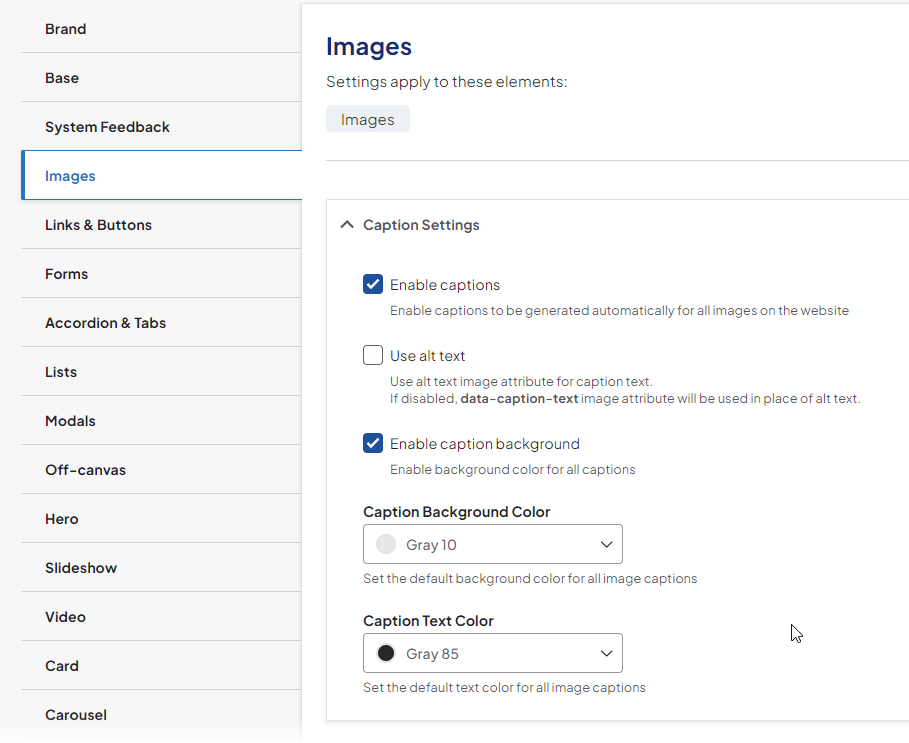
- Enable captions: Enable captions to be generated automatically for all images on the website
- Use alt text: Use alt text image attribute for caption text.
- Enable caption background: Enable background color for all captions.
- Caption Background Color: Set the default background color for all image captions. Choose a color from the colors defined in your brand.
- Caption Text Color: Set the default text color for all image captions. Choose a color from the colors defined in your brand.
Related Help Content
 DXE
DXE
Oct 2023 release notes
Browse A-Z section for Services search pageYou can now set Services search pages to show a convenient br...
DXE
Jun 2024 release notes
Conditional BrandsWe have introduced a new Conditional Brands feature in Digital Experience Engine (DXE)!...
Release notes: July 9, 2026
In this release: Accessibility code for location search | Events "Add to calendar" update | Differentiati...
DXE
Release notes: May 2025
Quickly find and fix broken linksMake sure your site is up to date with our brand new feature.What it isT...
DXE
Release notes: October 9, 2025
Breadcrumbs — now clean, consistent, and predictableWe’ve simplified how the current page shows up in...
Release notes: July 23, 2026
In this release: Smart link labeling for screen readers | Screen reader media-type prefixes for search re...