Overview
The FAQ Group component is a specialized accordion designed for FAQ content. Key differences from regular accordion components include:
- Ability to expand/collapse all FAQs at once
- Ability to set all FAQs to expanded by default
- FAQ schema markup that helps search engines show FAQ-rich snippets
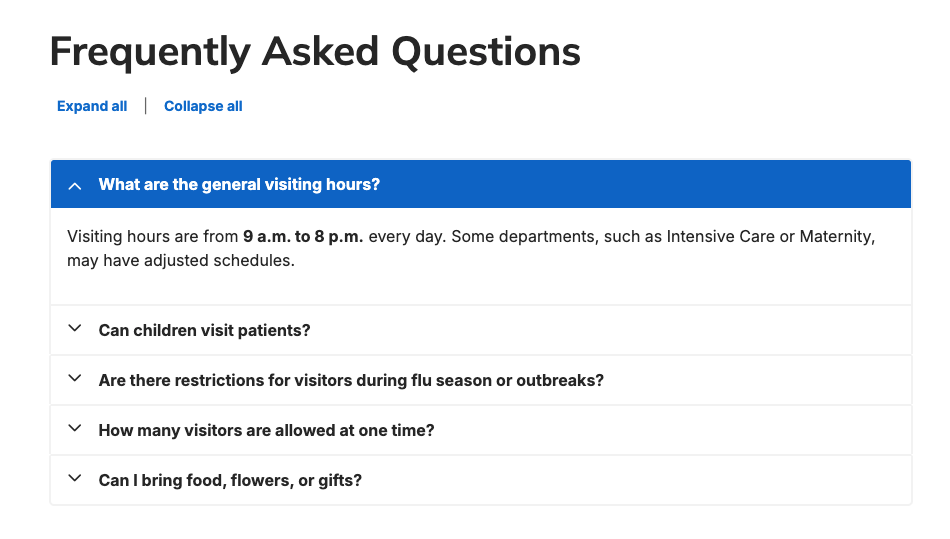
Adding a new FAQ Group
-
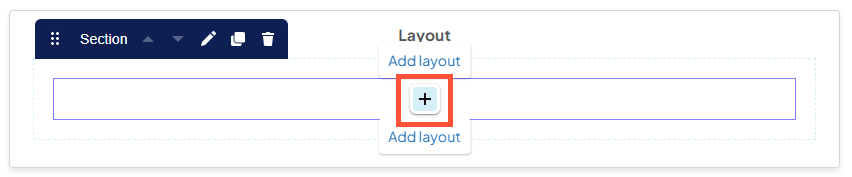
Hover the mouse over an empty section in a layout, then click the + icon that appears.
-
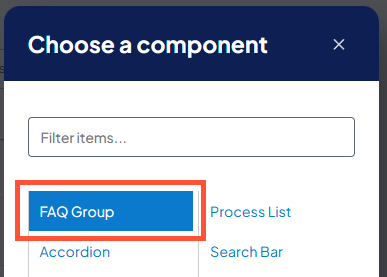
In the Choose a component window that appears, click "FAQ Group".
Configuring a new FAQ Group
- Heading: Enter the header text that appears at the top of the FAQ Group accordion.
- Accordion size: Select the size (height) of the collapsible accordion panels. Options are "regular" or "small".
- Accordion Style: Visual style of the accordion. Options are "regular" or "ghost". Ghost style accordions have no fill color.
- Include FAQ schema markup: Adds structured data to help search engines display FAQ rich snippets in search results.
- Expand all answers by default: All answers will be visible (i.e., all accordion panes will be expanded) when the page loads.
- Show expand/collapse all controls: Adds buttons to expand or collapse all answers at once.
Adding FAQs to the FAQ Group
- Title (Question): Enter the FAQ to be answered here.
- Pane (Answer): Enter the FAQ answer details here.
- Collapse: Collapses the corresponding FAQ question and answer in the Create new FAQ Group window. The button label will change to Edit and can be used to re-expand it.
- Add FAQ Item: Adds another empty FAQ pane to the list.
Removing an FAQ
-
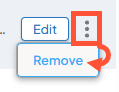
Click the 3 dot menu next to the Edit/Collapse button, then click Remove.
Best practices
- Use FAQ Group accordions for FAQ information only. For other types of information, you have the option to use a DXE Accordion.
- FAQs generally have short, concise answers. If the content in an FAQ requires scrolling, consider whether it needs its own Post.
Related Help Content
 DXE
DXE
Release notes: April 16, 2026
Listing Grids in Posts: Fixed an issue where custom text entered in the Read more label field for Listing...
DXE: Adding content
Blocks (shared elements)
SummaryA “block” is a section of user created/configured content. You would generally use a block whe...
DXE: Adding content
Image guide
Use these specifications for general guidance on selecting and preparing images for your site. While they...
DXE: Adding content
Headline and Media Marquee component
OverviewA Headline and Media Marquee is a component that can be placed in an Enhanced Layout page. It can...
DXE: Builder basics
Reference: Global search tab
OverviewThe Global Search tab in Theme settings allows you to set how global search bar components behave...
DXE: Builder basics
Missing Content Reference Report
OverviewThe Missing Content Reference Report checks your site for any DXE content that has been deleted o...