Summary
When blocks are assigned to any other region on the page, they will appear only in that region (and only when the Visibility settings are met). This is good for site consistency, but there may be cases when you want more specific control over when and where blocks appear.
Blocks placed in the Hidden Blocks region can be added to any section of a layout by adding a Block Embed component to whichever section you want:
Process
-
Hover over a layout section to reveal and click the + button:

-
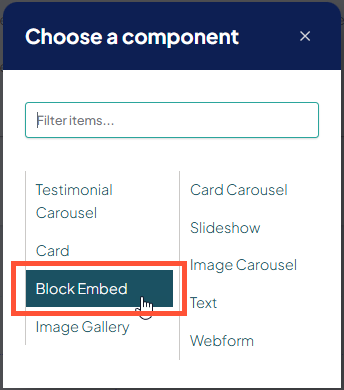
In Choose a component, click Block Embed:
- Enter the name of your Hidden Block and select it in the autocomplete suggestions, then click Save.
The Hidden Block will now appear in the section you placed it.
Related Help Content
 DXE: Adding content
Brand
A “brand” is where you define the following for your site:Complete color paletteBoth for your brand a...
DXE: Adding content
AI Content Generator
OverviewThe AI Content Generator is an inline tool in rich-text editors used to draft and refine content ...
DXE: Organizing content
Deleting menus or menu items
Removing a menu item from the menuClick the dropdown arrow next to the menu item’s Edit button, then cl...
DXE: Adding content
AI Assistant (Body editor)
OverviewThe In-Editor AI Assistant brings powerful AI-driven functions to expedite writing, editing, and ...
DXE: Builder basics
Taxonomy Usage Report
wistia-player[media-id='gbj6bmfwfi']:not(:defined) { background: center / contain no-repeat url('https://...
DXE: Configuration
How-to: Set an alternate Provider search engine
SummaryDigital Experience Engine (DXE) supports 2 provider search experiences:Opening a built-in search r...