Our guiding standards for AI enhancements in DXE
In general, AI enhancements are pushing boundaries faster than ever before. It’s an extremely powerful tool, and we’re thrilled to keep DXE on the cutting edge by incorporating more AI features. However, we understand any hesitation you might have to use AI-based features yourself. Rest assured that any AI enhancements we add will leave you in complete control. Our guiding standards for AI enhancements in DXE include, but are not limited to:
- AI can generate draft content, assets and recommendations, but must have a human review before publishing.
- No bulk edits or changes without human approval.
- AI will never access, store, or touch PII or PHI in any way.
- AI use can be tracked in the CMS.
- AI use cases will respect appropriate role permissions of the user.
With that in mind, let’s explore DXE’s latest improvements!

Watch a demo video of the new AI features with this release!
AI alt text magic for your images
Instantly generate descriptive, accessible alternative text using smart AI analyzer tools.
What it is
You can now use AI to automatically generate descriptive alternative text for images uploaded to provider and location content nodes. Instead of outputting generic visual descriptions, the built-in AI analyzes existing verified data on the page to create highly relevant, accessible text that improves the user experience for non-visual visitors. For locations, it combines the image context with the specific location name, and for providers, it incorporates the provider's name, specialties, and location.

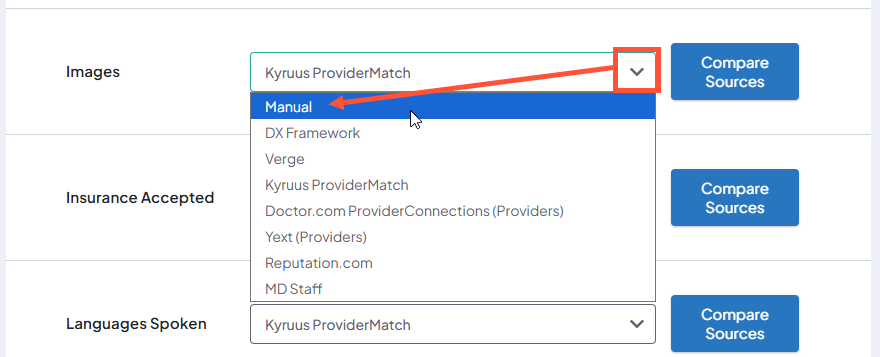 Additionally, if this source is changed back from Manual to an automatically syncing source, the image and AI generated alt text will be overwritten with the content from the source at the next sync.
How it works
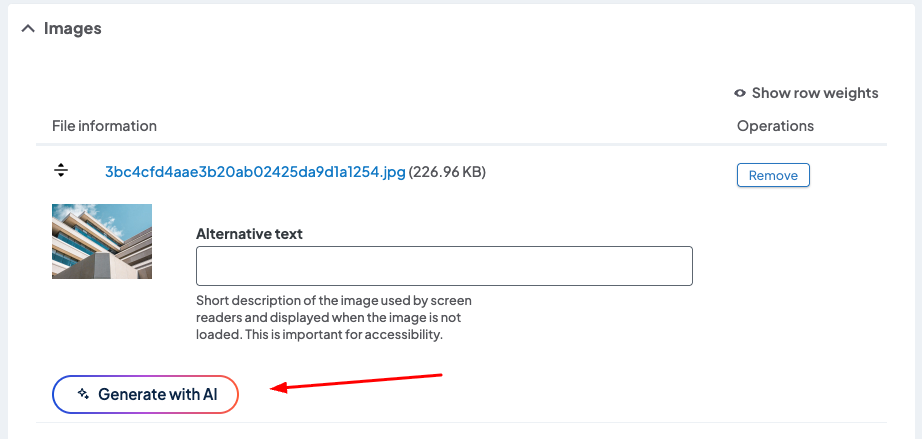
When you upload an image to a provider or location page, a new "Generate with AI" button will appear directly below the image preview. Click the button to initiate generation, which takes just a few seconds. The generated text will automatically populate the Alternative text field, allowing full editing control to edit descriptions before saving the node in the sidebar. Note that a 1-minute cooldown timer will display independently per image after use.
Why it matters
This feature saves content editors significant time during bulk uploads while drastically boosting your site’s web accessibility compliance. By ensuring images contain accurate, context-aware description tags rather than generic text, screen-reader users gain a much more coherent browsing experience.
Instant AI biographies for providers
Draft professional, patient-friendly medical biographies at the click of a button.
What it is
You can now use AI to automatically generate comprehensive bio text for providers. The system uses only verified provider data present on the node to create a robust profile written cleanly at a 6th-grade reading level. It utilizes natural search engine optimization (SEO) terms and strictly avoids medical jargon or unverified clinical claims.
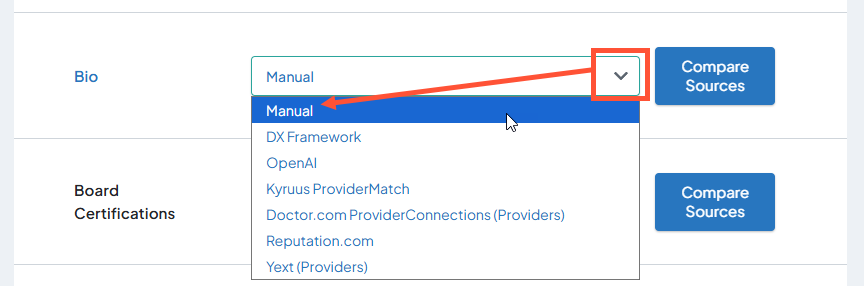 Additionally, if this source is changed back from Manual to an automatically syncing source, the image and AI generated alt text will be overwritten with the content from the source at the next sync.
How it works
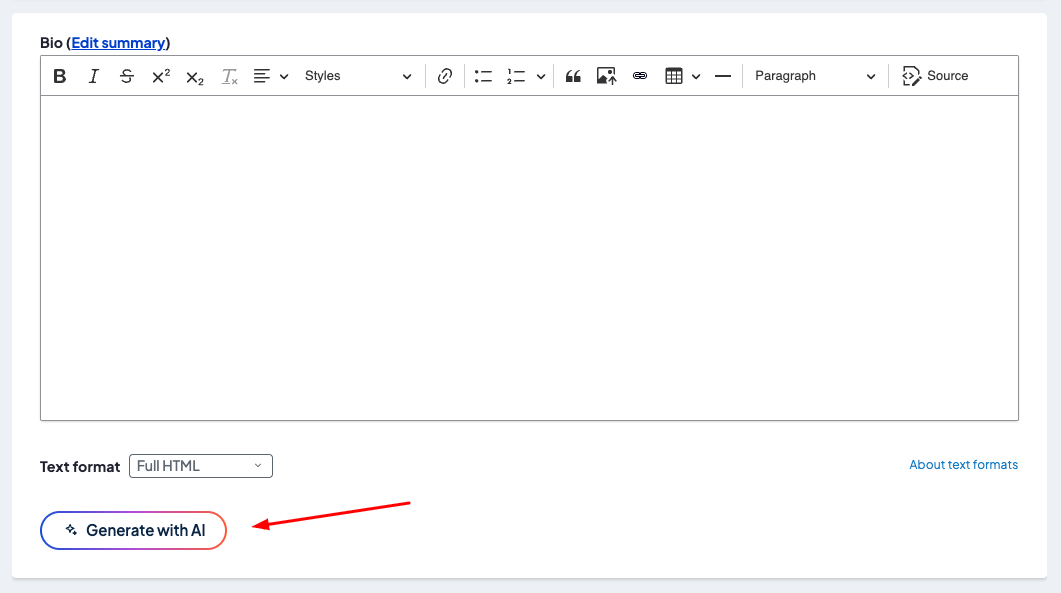
The same new "Generate with AI" button appears directly below the Bio field on the provider’s edit screen. Clicking the button initiates a brief generation process that automatically populates the text field. Content is fully editable, allowing you to review and refine the text before finalizing changes by saving the node in the sidebar. Generated content will replace any existing value in the field, and a 1-minute cooldown period applies after each generation.
Why it matters
Writing provider biographies can be a time consuming bottleneck during provider onboarding. This tool generates clean, optimized, and easy-to-read profiles instantly, ensuring your directory content remains professional, uniform, and search-engine friendly.

Smarter events search accessibility
Screen readers will now automatically broadcast live event search total adjustments.
What it is
An ARIA live region has been added to the status area of the events search component. This ensures that assistive tech platforms dynamically track and communicate updates to search results. Furthermore, a user-friendly message now displays when searches return zero matching events.
How it works
This enhancement is applied globally and functions automatically across all sites using the events module. No manual backend setup or structural configuration is required by site managers.
Why it matters
This achieves strict compliance with international accessibility guidelines (WCAG 4.1.3 AA), eliminating situations where a screen reader user is left unaware that a filter change altered or emptied the results list.
Set it and forget it SEO value
Maximize your search engine visibility with automated, context-aware meta descriptions for all provider profiles.
What it is
This enhancement implements an intelligent, system-wide automated default for meta descriptions across all provider profiles. A “meta description” is an HTML tag that search engines (like Google) use as a preview snippet for search results. Using an advanced token string pattern, DXE dynamically analyzes available data for a provider —including full name, clinical specialties, facility site, city, and state—to build a natural sentence meta description. If a provider is “accepting new patients” or “offering virtual visits,” these details will be included in the summary. The logic is fully gender-aware, generating proper pronouns (He/She/They) and matching verb conjugations. If any information is missing, it can gracefully hide those sections or fall back to the main node title.
How it works
No configuration is required. The default SEO description pattern activates automatically on the backend, and the pattern itself cannot be edited (maintaining consistency). Content managers can still manually override this per provider by editing the Meta field on the provider. Any human-authored summaries are automatically protected and will not be overwritten by routine external database synchronizations.
Why it matters
Maintaining optimized search engine configurations across extensive rosters of healthcare providers is notoriously error-prone, resulting in poor wording or generic search snippets. This automated framework guarantees that every profile page delivers search-optimized, professional copy directly to Google and Bing from day one, enhancing click-through rates from search engine results pages while safeguarding specialized editorial customization.

- Carousel Widget Display: This fix addresses a layout issue where Location carousel widgets would break or fail to render correctly when placed inside hidden or subsequent tab panels. The update corrects the underlying slider mechanics so that navigation dots and canvas scaling accurately refresh when shifting tabs or resizing the browser window on both Location and Provider widgets.
-
Provider Feed Filter Behavior for Boolean Fields: This fix resolves a bug within the Widget Builder where unchecking a provider filter, such as "Online Scheduling" or "Accepting New Patients," forced the feed to show inverted, opposite results. Unchecking a filter rule will now cleanly delete that constraint entirely from the query without restricting results.
Note: If you have any existing Provider Feeds, you must briefly toggle and re-save them to apply this fix. - Search Filters Display in Mobile Safari Browser: This fix resolves an issue where generic search component filter choices would suddenly vanish when viewed on mobile Safari web browsers. By adjusting the layout's structural CSS, the platform prevents specific interface modifier classes from accidentally hiding active filter options, preserving full mobile navigability.
Related Help Content
 DXE
DXE
Release notes: April 30, 2026
The universal access update: seamless navigation for every userWe’re continually working to improve cor...
 DXE
DXE
Jan 2023 release notes
Updates to "Find a location"We have revamped how Locations are presented in DXE for a more streamlined an...
Release notes: July 23, 2026
In this release: Smart link labeling for screen readers | Screen reader media-type prefixes for search re...
DXE: Adding content
Release notes: January 2025
Add your own site styling and functionalityOur new CDN (“Content Delivery Network”) Asset Injector is...
DXE
Release notes: July 2025
Unlock dynamic review sorting for provider profiles!Introducing a new Review Display Order setting that l...
DXE
Feb 2024 release notes
Expedited search index updatePrevious to this update, any changes made to a page or post title (or other ...