Set it and forget it: Automated scheduling for content blocks
Say goodbye to manual updates and midnight logins with our new automated scheduling feature for content blocks. Log a support ticket to get access to scheduling block content.
What it is
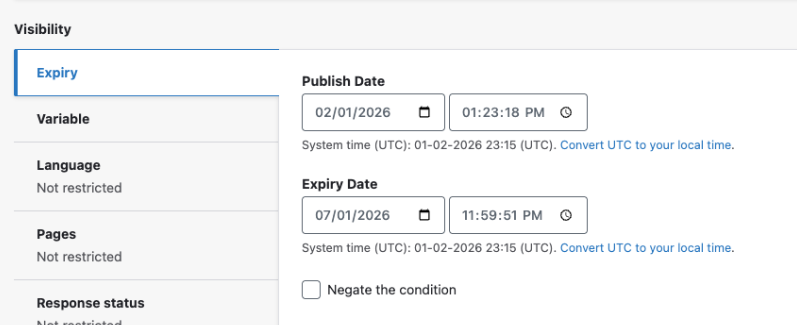
The Block Scheduler is a powerful new configuration tool that allows you to set precise "publish" and "expiration" dates for individual content blocks. It transforms static components into time-sensitive assets that appear and disappear exactly when you need them to.
How it works
Once enabled, you can manage transitions directly within the block editor:
- Configure: Find the new "Expiry" tab within the visibility section of any block. Enter your desired start and end times based on your site’s local timezone (found in Regional Settings).
- Toggle: Need to pause the schedule? Check "Negate the condition" to override the timing without deleting your dates.
- Deploy: Hit "Save block" to lock in your automated schedule.
Why it matters
Consistency is key to a professional user experience, but manual content swaps are prone to human error and "content rot." Whether it’s an urgent alert for holiday hours, a limited-time promotion, or a seasonal banner, this feature allows you to plan ahead and automate your workflow. It ensures your site remains relevant and up-to-date without requiring a team member to be online the moment a campaign starts or ends.


Link management made easy: Streamline your site maintenance
Maintaining a seamless user experience just got much simpler with an update to include bulk field scanning in the Link Checker setup.
What it is
The Link Checker is a powerful diagnostic tool that crawls your site to identify broken links, presenting them in a central report. We’ve introduced a behind-the-scenes enhancement that allows bulk-enabling fields.
How it works
After support enables "Link Checker" and its related features, you can manage everything from a single screen:
- Bulk automated scanning: Support can trigger an immediate audit by reanalyzing your content, or your site will automatically re-scan fields based on your site's schedule (typically once per day).
- Actionable reports: View all discovered issues at a glance under Reports > Broken links.
Why it matters
Broken links are more than just a nuisance; they hurt your SEO rankings and frustrate your visitors. Previously, protecting a large site required a tedious, field-by-field setup that was prone to oversight. This update drastically reduces administrative overhead, ensuring that every corner of your site is monitored for link health with minimal effort. It’s about spending less time on configuration and more time on creating a reliable, high-quality digital experience.

- Text alignment (left, center, right, or justified) chosen in the back-end editor wasn't translating to the live website. This update ensures that the visual styling you see in your workspace matches the experience of your site visitors.
- Previously, clicking an autocomplete suggestion in the global search modal failed to redirect users to the actual content page, even when the "Redirect to content page" Theme setting was enabled. We have resolved this issue, ensuring that users are now immediately routed to their selected result as expected when this configuration is active.
- Updated permissions to provide access to the Missing Content Reference Report (Configuration > Mercury Features > Missing Content Reference Report).
- We corrected an error on the site search results screen where the number displayed on the “All” tab did not match the actual volume of results found. This fix ensures the results count is now accurate, providing users with a reliable summary of their search totals.
- We resolved a bug where widgets were ignoring the "affiliations" filter, causing them to display incorrect content even when specific parameters were set. With this fix, any affiliation filter configured in the widget builder will now properly restrict the results to show only the relevant items.
- We resolved an issue that prevented users with various user roles from modifying the subheading field within content feed blocks. This fix restores full editing permissions for the appropriate roles, ensuring you can once again update and manage all block text as intended.
Related Help Content
 DXE
DXE
Ignite U newsletter
Our newsletter is designed to spark ideas, help you unlock the full value of DXE, and engage and convert ...
DXE
Release notes: June 2025
Visual enhancements for content feedsContent feeds, location search, and provider search now all align fo...
DXE
Sept 2024 release notes
New component: Listing GridThe new Listing Grid component allows for the display of a group of related co...
 DXE
DXE
Jun 2023 release notes
Search barOne of our most requested enhancements is now released! The new Search bar component can be pla...
DXE
Accessibility support
WebMD Ignite is committed to providing health content and solutions that are relevant, relatable, and hel...
DXE
Release notes: March 26, 2026
Note: The full release was completed on April 7th following a brief partner-related delay that affected t...