Precision meets proximity: smarter local search
We’ve overhauled Local Search pages to ensure patients find the right providers at the right locations with pinpoint accuracy.
What it is
This update introduces a refined filtering logic to ensure your Local Search pages are both easier to build and more accurate for the end user.
How it works
We’ve upgraded the search intelligence and page creation flow in two key ways:
- Logic overhaul: Filters now use a "Smart Match" approach. While users can still select multiple options within a category (e.g., choosing Cardiology OR Neurology), the system now enforces requirements across different categories (e.g., Specialty AND specific Affiliation).
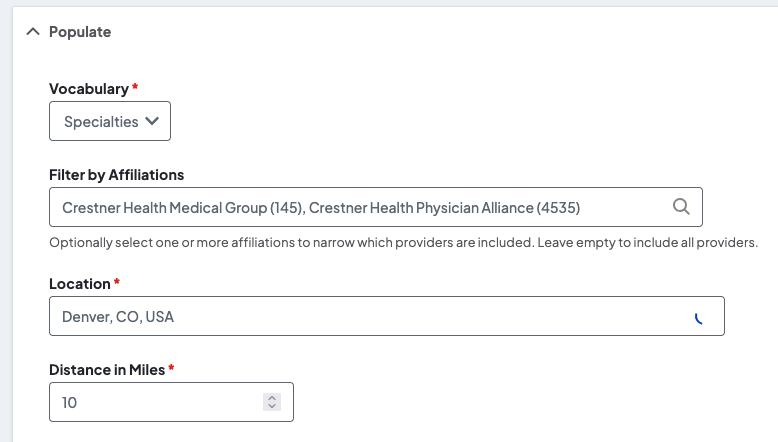
- Location-first creation: You can now generate Local Search pages directly from location records. We’ve added a new UI to select multiple locations, controls for provider density (results per page), and the ability to hide the standard search interface to keep the focus strictly on those specific sites.
Why it matters
Inaccurate search results lead to patient frustration and administrative headaches. By requiring providers to meet all specific criteria rather than just one "tag," your lists stay lean and relevant. Furthermore, being able to spin up location-specific pages directly from records saves your team time and ensures that when a patient looks at a specific clinic's page, they only see the providers who actually work there.

Color harmony and selection power: a smarter Widget builder
Designing custom widgets is now faster and more intuitive with prioritized branding and enhanced multi-selection capabilities.
What it is
Widget Builder has received two significant usability upgrades: a reordered Brand palette picker that matches your theme's hierarchy and a transition from autocomplete fields to for all filters.
How it works
-
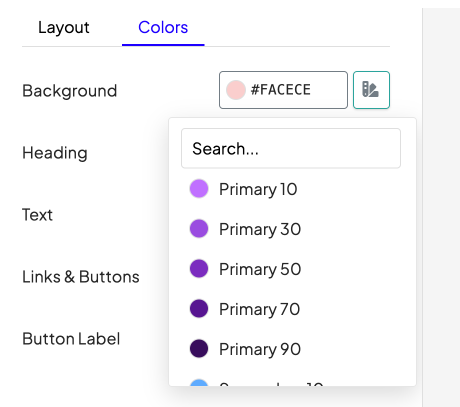
Intuitive Color Sorting: The Brand color picker no longer displays colors alphabetically; instead, it follows the specific order established in your Theme Settings, such as Primary, Secondary, and Tertiary.
-
Scanning & Selecting: Filter items have been updated to a multi-select field type, replacing the old autocomplete system.
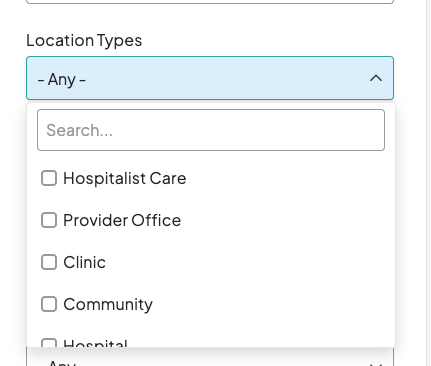
- User Choice: This new input style allows you to view the entire list of available options at once and select multiple entries simultaneously.
Why it matters
These updates streamline the design process by providing a more logical way to browse colors and a more efficient method for applying filters. By allowing users to see all available filter options at a glance and choose exactly what they need without repetitive typing, the Widget Builder becomes a more powerful tool for rapid customization.

- Static Google Maps: On provider and location detail pages, static Google Maps were failing to load for specific sites. This was caused by those sites hitting the maximum API call threshold allowed for a single digital signature, resulting in service disruptions. To resolve the bottleneck, we implemented additional signatures and configured unique secret keys across all remaining affected sites. This update concludes a successful phased rollout initiated in January 2026 and ensures consistent map loading by distributing the call volume across multiple authenticated signatures.
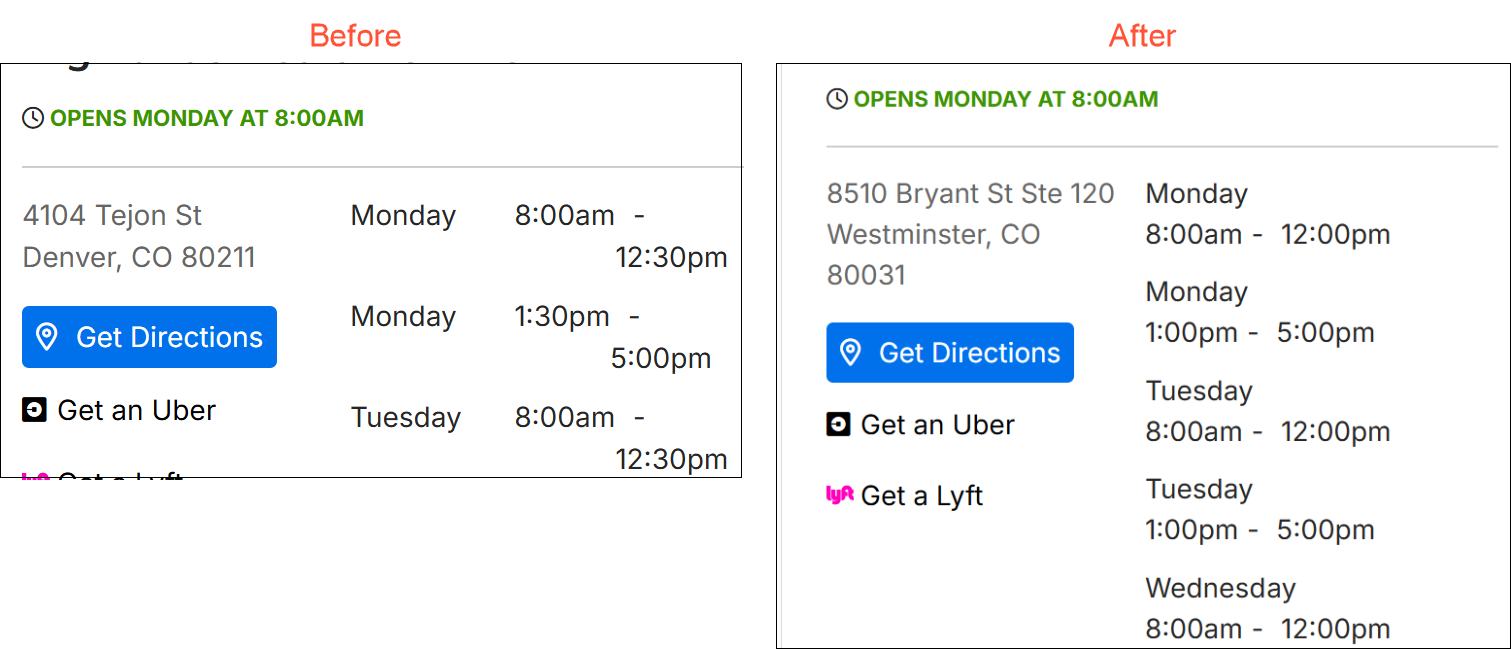
- Location hours layout fix: In the map view sidebar, business hours on location cards were occasionally too long for their container, causing text to overflow or wrap awkwardly. We updated the styling to move the day and times onto separate lines. This stacked layout prevents horizontal overlap and ensures text remains contained regardless of string length.
-
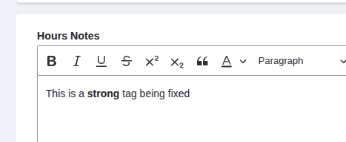
Content editor fix: Windows users were experiencing an issue where bold text failed to render visually in the content editor due to a platform-specific CSS inconsistency. The styling was adjusted to ensure bold markup displays correctly across all operating systems.
Related Help Content
 DXE
DXE
Release notes: March 2025
Provider Search: Sort tiersGet complete control over the sort order in DXE Provider Search and prioritize...
DXE
Release notes: December 2024
Introducing Provider Search!A new and improved provider search experience in DXE!What it isThe DXE Provid...
DXE
WebMD Ignite email domains
OverviewWebMD Ignite uses several email domains for communications for different purposes. Security/email...
DXE
Sept 2024 release notes
New component: Listing GridThe new Listing Grid component allows for the display of a group of related co...
DXE
How-to: Use Link checker
OverviewWhen set up, Link checker automatically scans your site on a regular schedule for broken links an...
DXE
Feb 2024 release notes
Expedited search index updatePrevious to this update, any changes made to a page or post title (or other ...