Check one, find them all: smart filters are here!
We’ve upgraded our Provider Search with smart parent/child logic to make finding the right care faster and more thorough than ever.
What it is
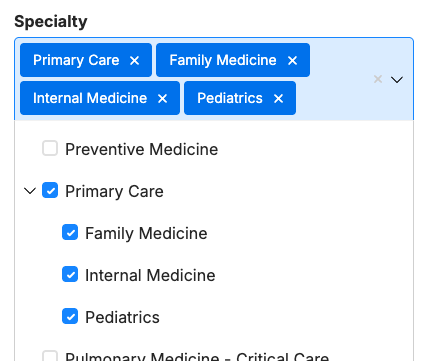
The Automated Child-Term Selection feature enhances our "Nested Multiselect" filters. When released, selecting a main parent category (like a major medical specialty) will automatically select and include all of its nested sub-categories (children specialties) in the search.
How it works
- Smart Parent/Child Logic: When a user checks a parent specialty box (e.g., “Primary Care” in the screenshot below), the system instantly rolls up and checks all related sub-specialties beneath it.
- Synchronized Search State: We’ve eliminated the technical lag during rapid clicking. The user interface and the search URL now stay perfectly in sync, ensuring no selected categories are "missed" during fast interactions.
- Configurable Settings: Administrators can customize this behavior for each filter by navigating to: DXE Theme Settings > Providers tab > Provider Search Page > Filters & Sort and changing the dropdown value under “Nested multiselect”.

Why it matters
Manually clicking through dozens of granular sub-specialties is tedious and leaves room for users to accidentally miss relevant providers. By automating this selection, users get comprehensive, accurate search results with a single click, drastically improving the search experience and saving valuable time.
Double the action: multi-video support is here
Showcase your providers and locations with more dynamic content than ever before.
What it is
We’ve upgraded Provider and Location detail pages to support an unlimited number of videos. Instead of being limited to a single highlight reel, you can now curate more video content for every profile.
How it works
The process is simple and fits right into your existing workflow:
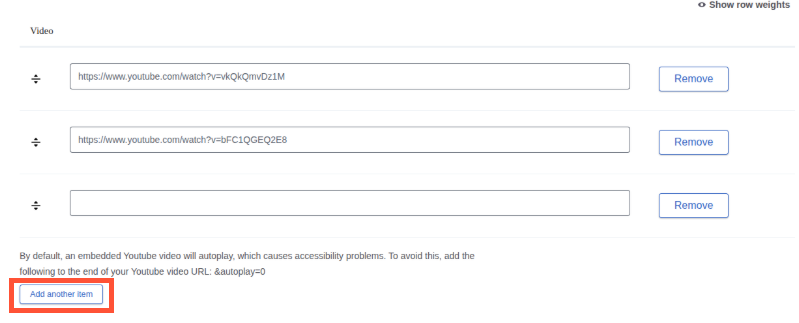
- Navigate to the Video field on any Provider or Location detail page.
- After adding your first video, look for the new "Add another item" button.
- Click the button to generate an additional field for your next video link or upload.
- Repeat as needed to build out your media library.
Why it matters
A single video often isn't enough to tell the whole story. By supporting multiple videos, you can now provide a comprehensive view of your services—combining a provider's personal introduction with patient testimonials, or pairing a facility tour with specific procedure overviews. More content means better engagement and more informed decisions for your clients.

One page, one script: saying goodbye to duplicate FAQ errors
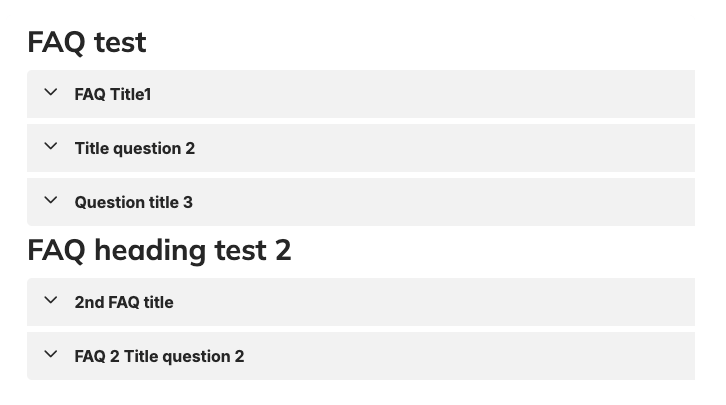
We have re-engineered how FAQ schema is generated on our platform, consolidating multiple individual FAQ components into a single structured data script to keep your SEO perfectly clean and error-free.
What it is
This update resolves a technical SEO conflict involving multiple FAQ Group components deployed on a single page. Previously, whenever multiple independent FAQ blocks were utilized, each block dynamically generated its own isolated JSON-LD metadata block labeled as an individual "FAQPage." This release replaces those fragmented scripts with a unified, centralized page-level schema handler that automatically groups all FAQs together under a single, valid data layout.
How it works
We completely overhauled our backend template architecture to streamline data injection. Instead of letting individual component templates output isolated scripts directly into the page markup, the platform now hooks into a centralized page-level attachment system.
- Component extraction: The template engine detects all independent FAQ elements scattered across the page layout.
- Array merging: Rather than printing multiple standalone blocks, the backend aggregates every single question-and-answer pair.
- Unified JSON-LD generation: All extracted entries are merged seamlessly into a single, cohesive mainEntity array inside one localized script wrapper.
- Template cleanup: Redundant individual script outputs have been entirely removed from downstream component templates to ensure zero script pollution.
Why it matters
Search engines like Google have become increasingly strict regarding structured data specifications. When Google Search Console (GSC) crawled pages containing multiple disconnected FAQ components, it flagged them with duplicate errors, generating warnings that could compromise rich result placements.
By shifting to this consolidated mechanism, your site automatically satisfies search crawler expectations. This effectively eliminates GSC validation errors, safeguards your eligibility for coveted FAQ rich snippets, and streamlines indexing—all without limiting the creative freedom of your content layout or requiring any manual fixes from your team.

- Enhanced Layout Tab Widget Rendering: This fix resolves a critical issue where Provider and Location feed widgets failed to load properly or collapsed when placed on subsequent panes of a tab component. This update stabilizes multi-column and carousel layouts within tabs, ensuring carousels no longer trigger accidental page refreshes during navigation. Additionally, the fix eliminates visual layout "flicker" with smooth transitions, keeping the user interface intact and seamless as users switch between tabs.
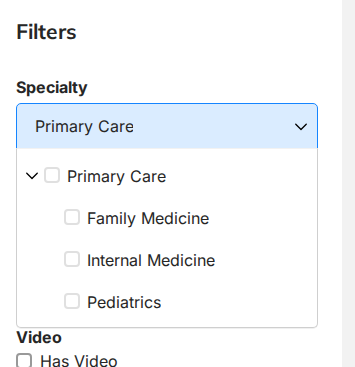
- The Specialty Filter Search Improvements fix resolves a bug where searching for a "parent" specialty category (like "Primary Care") inside the Specialty filter search box incorrectly returned a "No results found" error. The corrected search logic now ensures parent terms successfully appear in the results alongside all of their nested child terms (like "Family Medicine"). Additionally, the filter now automatically expands the results list upon searching, allowing users to view all matching sub-categories immediately without needing to click extra navigation arrows.
- Event attachment URL cleanup: We addressed a broken link issue in Content Apps events, where file attachments and images failed to load because their CDN prefixes were being duplicated into a loop. This happened because the API was delivering raw file paths to page templates without checking for pre-existing prefixes. To solve this, a new "URL sanitizer" helper was implemented to automatically catch and remove repeated domains, restoring broken links and images back to a single, functional URL.
Related Help Content
 DXE
DXE
Release notes: May 14, 2026
No more empty slots: cleaner hours at a glanceWe’ve streamlined the location detail view to ensure you ...
DXE
Release notes: April 2025
Source Sync Report for third party providers and locationsIntroducing a new module giving you access to a...
DXE
Release notes: February 2025
Provider Search: Support for nested termsNew filter options help your users get straight to the Providers...
DXE: Adding content
Best way to display content
With DXE, you have three flexible tools for featuring related content: Listing Grids, Content Feeds, and ...
DXE
Release notes: July 2025
Unlock dynamic review sorting for provider profiles!Introducing a new Review Display Order setting that l...
DXE
Release notes: December 2024
Introducing Provider Search!A new and improved provider search experience in DXE!What it isThe DXE Provid...