Bigger, Better, More Accessible: DXE Header Search Upgrade
Easier tapping and clicking for everyone when searching on your DXE site.
What it is
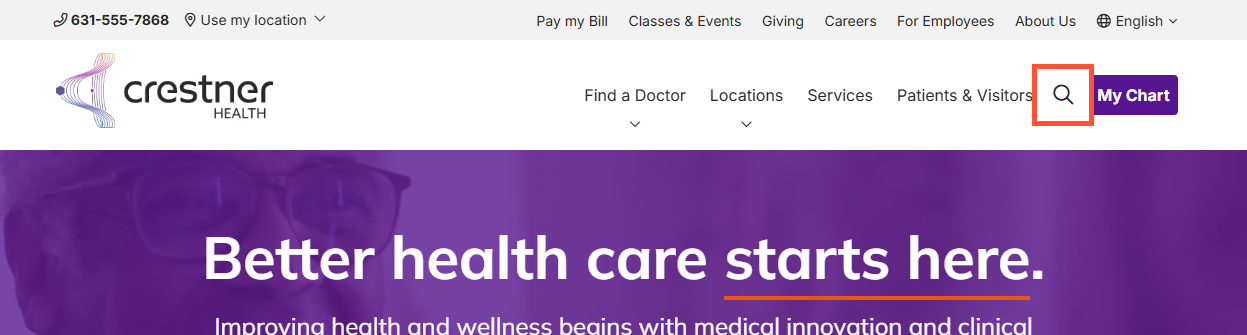
Previously, the clickable area for this icon was too small at 20x20 pixels. The minimum interactive target size has been increased to 24x24 pixels.
How it works
No new configuration required. The search icon itself looks the same visually, but the invisible bounding box users click or tap is now slightly larger and centered.
Why it matters
This upgrade greatly improves usability and accessibility, particularly for users on mobile devices or touchscreens. Additionally, it brings the Header Search button into full compliance with international accessibility standards, specifically WCAG Success Criterion 2.5.8: Target Size Minimum.
Screen Reader Enhancements for Dynamic Search Results
Users of screen readers now hear updated results when performing new searches!
What it is
The generic search filter component for HealthHub and DXE’s Generic Search has been enhanced, improving accessibility for visually impaired users. We added background tags to the result label allowing screen readers to announce the total number of search results whenever the number updates.
How it works
This is a non-visual accessibility improvement, meaning there is no change in the UI. When a user changes filters or performs a new search, the total number of results changes dynamically. Screen readers will now automatically announce this updated count (e.g., "Showing 12 results") as soon as it changes.
Why it matters
This provides a smoother and more informative experience for users relying on assistive technologies and ensures our dynamic search updates satisfy WCAG Success Criterion 4.1.3 (Status Messages).
Seamless Keyboard and Screen Reader Navigation for Menus
The DXE header's side-navigation menu functionality now ensures smooth keyboard and screen reader support.
What it is
This update addressed two accessibility issues with the off-canvas (side-navigation) menu in the DXE header. Previously, hidden menu links remained active in the background tab order when closed, meaning they were highlighted during keyboard tab through even though they were not visible on screen. The hamburger menu button remained hidden from the screen reader.

How it works
This is a non-visual accessibility fix that only impacts assistive technologies and keyboard navigation automatically. The system now completely hides the closed menu from keyboard focus and screen reader trees. Additionally, the button dynamically updates based on screen size, ensuring it is announced on mobile devices but ignored on desktops where the full menu is visible.
Why it matters
Keyboard users will no longer be required to tab through a series of "invisible" duplicate links before reaching the main page content. Furthermore, visually impaired users on mobile devices can now easily detect and open the navigation menu.
Squeaky Clean Schema: Enhanced Search Engine Crawlability
No more schema errors when search engines crawl DXE pages!
What it is
We have updated how provider information is shared with search engines (like Google) behind the scenes. DXE now automatically strips out all HTML tags from the description field, leaving only clean, plain text.
How it works
This enhancement works automatically and only affects the hidden data (schema markup) used by search engines to read the page. It does not change how the description looks to a user browsing the website.
Why it matters
This background cleanup ensures that Google and other search engines can perfectly crawl your provider pages without triggering any schema errors.

- Fixed "Age Groups Seen" Filter Not Applying: This fix resolves a bug in Provider Search 2.0 where selecting a specific age group incorrectly returned all results instead of accurately filtering them. This fix ensures the filter functions correctly, narrowing down results based on the chosen age criteria for a better user search experience.
Related Help Content
 DXE
DXE
Release notes: October, 2024
Easily pick, click, and apply color to textWhat it isNew Color Picker tool in the WYSIWYG text editor yo...
 DXE
DXE
Feb 2023 release notes
Theme UpdatesButton StylesWe've added more customizability to buttons in DXE! Now you can choose between ...
DXE
Release notes: July 2025
Unlock dynamic review sorting for provider profiles!Introducing a new Review Display Order setting that l...
DXE
Release notes: May 2025
Quickly find and fix broken linksMake sure your site is up to date with our brand new feature.What it isT...
DXE
Jan 2024 release notes
Help Center now accessible in DXE menuWe've added a quick link to the profile menu in DXE to get to the D...
DXE
Release notes: October 30, 2025
Note: The updates described are scheduled to go live for the final stage of clients on Monday, November 3...